Drone Aerial · Big Scenery
Video
Shot list
Applying the template drops these shots into the canvas as editable cards. · About 13s in total
- 01High establishA high-altitude overview sets the scene4s
- 02Low flyoverA fast pass skimming close to the ground5s
- 03Orbit finaleOrbiting the landmark subject while climbing to close4s
What this prompt does
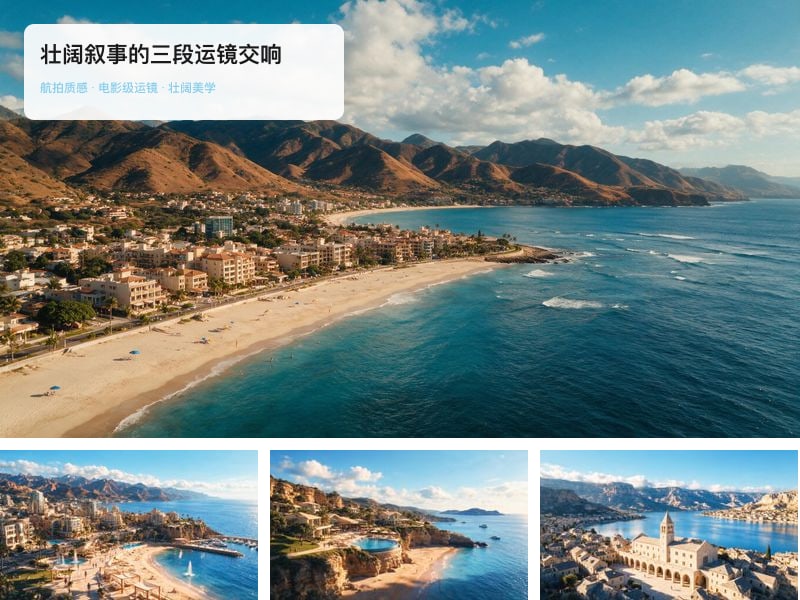
A drone aerial short: 13 seconds in three camera moves — a high-altitude establishing shot, a fast low-altitude flyover, and a closing orbit around the subject — for a wide, large-scale look.
- Keep all three shots in the same geographic location, with matching light, weather and time of day.
- Keep the camera path physically plausible — only a trajectory a drone could actually fly.
- Keep ground features in correct perspective; no warped or distorted buildings.
- High establish (4s): high-altitude downward view pushing slowly forward across the full coastline or valley panorama; early-morning side light brings out the layers of terrain, cloud shadows drift over the ground, the horizon stays level and the image stays sharp.
- Low flyover (5s): fast forward flight about 10 m above the ground; treetops or breaking waves sweep backwards under the camera for a sense of speed, with natural motion blur, a smooth shake-free flight path and correct perspective.
- Orbit finale (4s): a half-orbit around the landmark subject in the scene (lighthouse, lone tree or building) while climbing slowly; the subject stays centred, the wide background rotates open, and the shot pulls back to a held frame.
16:9 landscape, ultra-sharp aerial image quality, natural light, no water traces on the lens and no propellers in frame, no text or watermark.
Cost estimate
At Seedance 2.0's published rate of $0.271/second, the full set is about 13s ≈ $3.52 (re-runs not included).
Rates are the Starter tier figures from the pricing page and vary slightly by tier; the credit prompt shown before each generation is authoritative.
FAQ
What do I need to upload?
Nothing. This template runs without uploads.
Can I use the output commercially?
Yes. What you generate on Tovaki is yours to use commercially at no extra charge, subject to each model provider's content policy.
Can I switch models?
Yes. The template recommends Seedance 2.0, and once you are in the canvas every shot can be re-run on a different model.